Setup
Five ways in. All of them create the same auto_router/complexity_router deployment.
Dashboard presets
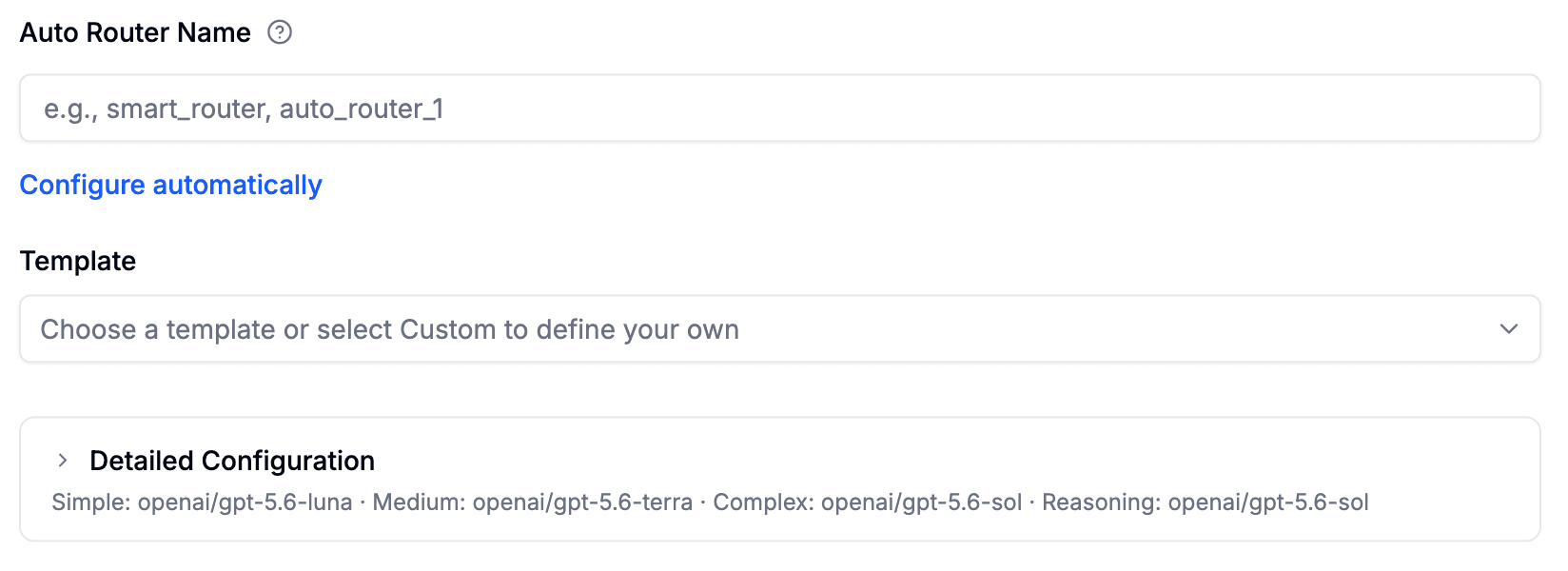
- Models + Endpoints, Add Model, Auto Router tab.
- Configure automatically checks the models your proxy already serves, selects the best available models for all four complexity tiers, and fills in the form for you. Review the generated tiers before saving.
- Templates: 1M Context, Anthropic Family, OpenAI Family, Gemini Family, Lite. Each fills all four tiers from models your proxy already serves.
- A template whose models are not deployed is greyed out with the missing names listed.
- Test Routing sends one prompt through the classifier and shows the model it would pick. Nothing is created and the picked model is not called.
- Test Connection runs a minimal request per tier model group. Green means reachable with your credentials.
- Detailed Configuration holds the rest: keyword rules, LLM classifier and prompt, escalation keywords, adaptive pools.
The templates as config.yaml: Recommended Configurations. Release post: AutoRouter: 1 Click Deploy.
Agent skill
run curl -fsSL https://docs.litellm.ai/skills/auto-router and follow the instructions
- Reads the models your proxy already serves.
- Asks for the router name and a model per tier.
- States the defaults it is assuming before it writes anything.
config.yaml
model_list:
  - model_name: gpt-5.6-luna
    litellm_params: {model: openai/gpt-5.6-luna, api_key: os.environ/OPENAI_API_KEY}
  - model_name: gpt-5.6-terra
    litellm_params: {model: openai/gpt-5.6-terra, api_key: os.environ/OPENAI_API_KEY}
  - model_name: claude-sonnet-5
    litellm_params: {model: anthropic/claude-sonnet-5, api_key: os.environ/ANTHROPIC_API_KEY}
  - model_name: claude-opus-5
    litellm_params: {model: anthropic/claude-opus-5, api_key: os.environ/ANTHROPIC_API_KEY}

  - model_name: smart-router
    litellm_params:
      model: auto_router/complexity_router
      complexity_router_config:
        tiers:
          SIMPLE:    gpt-5.6-luna
          MEDIUM:    gpt-5.6-terra
          COMPLEX:   claude-sonnet-5
          REASONING: claude-opus-5
      complexity_router_default_model: gpt-5.6-terra
- Tiers name other
model_nameentries in the same file, so every tier is a deployment the proxy already knows. complexity_router_default_modelserves whenever the router cannot decide.- No
classifier_typemeans the heuristic scorer: free, no added latency. classifier_type: llmwith a small model raises accuracy on agent traffic for a fraction of a cent per request. See benchmarks.- Everything else (keyword rules, tier pools, session affinity, scorer tuning): configuration reference.
Model-management API
For CI/CD or scripts, create the same deployment with POST /model/new. Enable store_model_in_db first; Auto Routers are model deployments, so there is no separate /auto_router/new endpoint. This example uses the Anthropic Family preset; create the referenced model deployments first.
curl -X POST "http://localhost:4000/model/new" \
  -H "Authorization: Bearer $LITELLM_MASTER_KEY" \
  -H "Content-Type: application/json" \
  -d '{
    "model_name": "claude-auto",
    "litellm_params": {
      "model": "auto_router/complexity_router",
      "complexity_router_config": {
        "tiers": {
          "SIMPLE": "claude-haiku-4-5",
          "MEDIUM": "claude-sonnet-5",
          "COMPLEX": "claude-opus-5",
          "REASONING": "claude-opus-5-high"
        },
        "classifier_type": "heuristic",
        "escalation_keywords": ["LITELLM ESCALATE"],
        "session_affinity": false
      },
      "complexity_router_default_model": "claude-sonnet-5"
    }
  }'
The response includes model_id. Use it with PATCH /model/{model_id}/update for partial changes, and call the router by its model_name. Validate a complexity configuration before saving with POST /auto_router/validate_complexity_router_config. See Model Management for deployment CRUD and Configuration Reference for the full router payload.
Autorouter CLI
- Stands up a throwaway local proxy that forwards every request to your real proxy.
- Routes Claude Code traffic through it for the session. Nothing bypasses the real proxy and its config is untouched.
- Guide: Autorouter CLI.
Claude Code and Claude Desktop
- Claude Code populates its model picker from
/v1/modelsand keeps only names containingclaudeoranthropic. Name the router accordingly, or setANTHROPIC_MODELdirectly. - On Claude for Teams or Enterprise, the exact router name must be on the organization allowlist. The check runs client-side, so a rejected router leaves nothing in gateway logs.
- A router advertises no context window until you declare one in
model_info, and Claude Code applies its own default regardless. Both sides: context window. - Tutorial: Auto Router with Claude Code and Claude Desktop.